


Hey there! I'm a supplier of cooling system components, and I know how crucial it is to keep these parts in top - notch condition. A well - cleaned cooling system not only extends the lifespan of your components but also ensures optimal performance. So, let's dive into how you can clean your cooling system components.
Why Cleaning is a Big Deal
Before we get into the nitty - gritty of cleaning, let me tell you why it's so important. Over time, dust, dirt, and debris can build up on your cooling system components. This buildup acts as an insulator, preventing efficient heat transfer. When heat can't escape properly, your components can overheat, leading to reduced performance, potential malfunctions, and even permanent damage. So, regular cleaning is like giving your cooling system a breath of fresh air.
Tools You'll Need
First things first, you'll need to gather the right tools. You don't need anything too fancy. A can of compressed air is a must - have. It's great for blowing away loose dust and debris. You'll also want a soft - bristled brush, like a paintbrush or a specialized electronics brush. This will help you get into those hard - to - reach areas. For more stubborn grime, a mild cleaning solution and some lint - free cloths are essential.
Cleaning the Radiator
The radiator is one of the most important parts of your cooling system. It's responsible for dissipating heat from the coolant. To clean it, start by turning off your system and letting it cool down completely. Safety first, right?
Once it's cool, use the can of compressed air to blow out any loose dust from the radiator fins. Hold the can upright and spray in short bursts. Make sure to cover the entire surface of the radiator. If there's still some dust stuck on the fins, use the soft - bristled brush to gently dislodge it.
For more stubborn dirt, you can make a mild cleaning solution. Mix a small amount of dish soap with water. Dip a lint - free cloth into the solution and gently wipe the radiator fins. Be careful not to bend the fins, as this can reduce the radiator's efficiency. After wiping, use a clean, damp cloth to remove any soap residue. Then, let the radiator dry completely before turning your system back on.
Cleaning the Fans
Fans play a crucial role in moving air through the cooling system. Over time, they can accumulate a lot of dust. To clean them, start by unplugging the fan from the power source. You don't want it to start spinning unexpectedly while you're cleaning.
Use the can of compressed air to blow away the dust from the fan blades. Hold the blades still to prevent them from spinning while you're spraying. If there's some stubborn dirt on the blades, you can use the soft - bristled brush to gently scrub it off.
If the fan housing is dirty, you can use the mild cleaning solution and a lint - free cloth to wipe it down. Just make sure not to get any liquid inside the fan motor. Once you're done, let the fan dry thoroughly before plugging it back in.
Cleaning the Heat Sinks
Heat sinks are designed to absorb and dissipate heat from components like CPUs and GPUs. They can get really dirty over time. To clean them, start by removing the heat sink from the component. This might require some technical know - how, so if you're not comfortable doing it, you might want to seek professional help.
Once the heat sink is removed, use the can of compressed air to blow out the dust from the fins. Like with the radiator, hold the can upright and spray in short bursts. If there's still some dirt left, use the soft - bristled brush to clean the fins.
For a deeper clean, you can soak the heat sink in the mild cleaning solution for a few minutes. Then, use a lint - free cloth to wipe it down. Rinse the heat sink with clean water and let it dry completely. Before reinstalling the heat sink, apply a fresh layer of thermal paste to ensure good heat transfer.


Our Cooling System Components
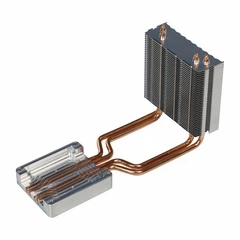
At our company, we offer a wide range of high - quality cooling system components. For example, we have the Aluminum Heat Pipe Communication Module Heatsink. This heatsink is designed to efficiently dissipate heat from communication modules, ensuring stable performance.
We also have the Lightweight Automotive Controller Water Cooling Plate. It's perfect for automotive applications, providing effective cooling for controllers while being lightweight.
And if you're looking for a solution for energy storage batteries, our Cavity - type Energy Storage Battery Water Cooling Plate is a great choice. It helps maintain the optimal temperature of energy storage batteries, extending their lifespan.
Maintenance Tips
Cleaning your cooling system components isn't a one - time thing. To keep your system running smoothly, you should make it a regular part of your maintenance routine. Check your components for dust buildup every few months, especially if you're using your system in a dusty environment.
Also, make sure to monitor the temperature of your components. If you notice that the temperature is higher than normal, it might be a sign that your cooling system needs cleaning.
Contact Us for Purchases
If you're in the market for high - quality cooling system components, we're here to help. Whether you're a DIY enthusiast or a professional in the industry, our products are designed to meet your needs. We offer competitive prices, excellent customer service, and fast shipping.
Don't hesitate to reach out to us if you have any questions about our products or need advice on cleaning and maintaining your cooling system. We're always happy to assist you in finding the right components for your specific requirements.
References
- "Cooling System Maintenance Guide" - General automotive and electronics maintenance handbook
- "The Importance of Radiator Cleaning" - An article from a leading cooling system research institute
So, there you have it! Now you know how to clean your cooling system components and where to find great products for your needs. Keep your system clean, and it'll keep running smoothly for years to come.